The Private PDF Workstation
Engineered for Windows & macOS.
Edit and modify PDF text directly with original layout preservation, convert PDF to Excel/Word with tabular accuracy, OCR scans, compress, and redact — running 100% locally on your PC or Mac with zero cloud document uploads.
 Papryx Desktop100% Local & Private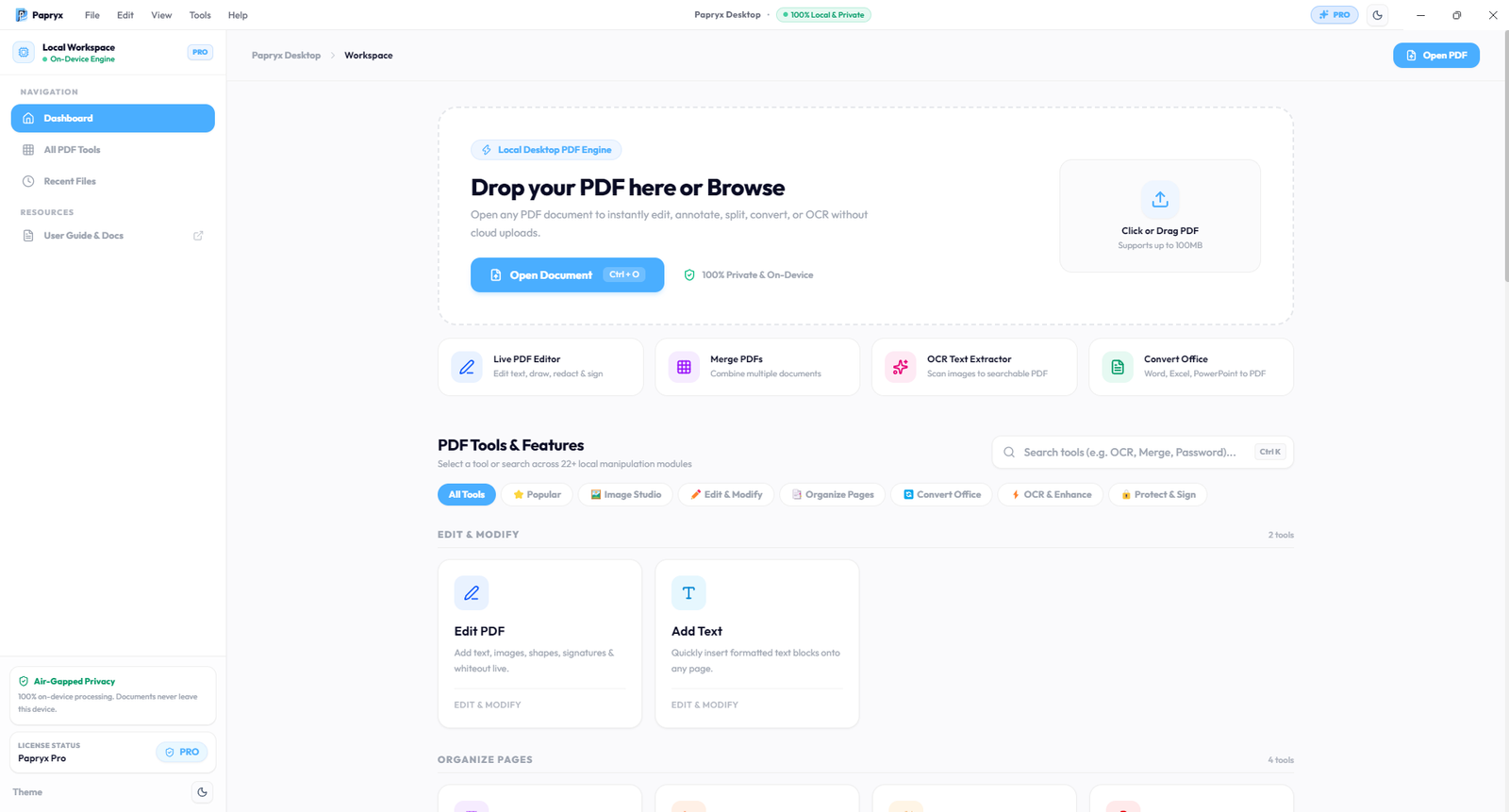
Zero Document Egress
Strict Loopback (127.0.0.1)
All PDF operations execute strictly on your local CPU. Zero document files, text layers, or names are ever transmitted to remote cloud servers.
Native NVMe SSD Speed
0ms Upload Bottlenecks
Eliminate 100MB upload delays. Convert, OCR, and compress 500-page balance sheets in seconds using local PC multiprocessing.
Air-Gapped Confidentiality
Client NDA & DPDPA 2023
Engineered for Chartered Accountants, legal counsels, and enterprise teams handling sensitive client audit sheets without risking NDA breaches.
Explore the Native Desktop Interface
Take an interactive tour of the genuine Papryx Desktop workstation interface.
Instant Drag & Drop Document Workspace
Launch documents directly into your local workspace at NVMe SSD speeds. Search across 24+ tools with instant keyboard shortcuts.
Papryx Desktop100% On-DeviceYour PDF Toolbox
Everything you need to edit, convert, sign, compress, and redact documents on Windows and macOS.
Direct Text Editor
Click and edit text inline on PDF pages with coordinate-accurate layout preservation
22 Offline Font Families
Bundled TrueType fonts (Liberation, Carlito, Roboto, Open Sans) for exact typography matching
Add Text & Form Fill
Rapid overlay tool for completing forms and stamping static text with custom styling
PDF to Excel (.xlsx)
High-precision table extraction with cell boundaries & Indian Rupee (₹) preservation
PDF to Word (.docx)
Convert multi-page documents to formatted, fully editable Microsoft Word files
PDF to PowerPoint (.pptx)
Extract presentation decks and visual graphics into editable slide formats
Word to PDF (.docx)
Native conversion preserving complex typography and margins directly to PDF
Excel to PDF (.xlsx)
Spreadsheet to PDF converter with Smart Reflow to prevent microscopic text shrinking
PowerPoint to PDF (.pptx)
Convert presentation decks into standardized, high-resolution distribution PDFs
Tesseract OCR Scanner
Local optical character recognition to make scanned receipts and PDFs searchable
Scanned Image Enhancer
OpenCV contrast normalization to clean up degraded mobile camera scan files
Compress PDF
Optimize and reduce file size up to 80% dynamically without text blur
Merge PDF
Combine multiple PDF files into one master document with custom page ordering
Split PDF
Extract specific page ranges or split large documents into individual chapters
Rotate Pages
Orient pages in clockwise/counter layouts and permanently save orientation
Delete Pages
Strip unwanted sheets from multi-page invoices, legal briefs, and contracts
Add Page Numbers
Insert custom headers, footers, and standardized page numbering dynamically
Add Watermark & Stamp
Apply custom confidential text and image watermark stamps onto document pages
Permanent Redaction
Permanently scrub underlying vector text, numbers, and PII from PDF binaries
AES-256 Encryption
Set military-grade User and Owner passwords to restrict printing or copying
Sign & Stamp PDF
Overlay electronic signatures and verifiable digital seals onto agreements
Metadata Scrubber
Strip author names, creation timestamps, and software history before sharing
Professional Image Resizer
Multi-mode studio for precise dimension, percentage scaling, and aspect ratio locking
Universal Format Converter
Batch convert between HEIC/HEIF, PNG, JPG, WebP, AVIF, TIFF, BMP, and ICO on-device
Images to PDF & PDF to Images
Bi-directional high-resolution conversion between image sets and print-ready PDFs
Traditional Cloud Tools vs Papryx
Why on-device desktop processing is the standard for document security.
- •Upload confidential files to remote cloud databases, increasing client data leak risks.
- •Suffer from slow performance due to upload/download bandwidth and queue wait times.
- •Lock essential features behind recurring cloud paywalls and file size caps.
- •100% Air-Gapped: Binary execution occurs on localhost (127.0.0.1) with 0 cloud egress.
- •Native NVMe Speed: Instant document processing with zero upload delay or network lag.
- •Full Confidentiality: Preserves client NDAs, EU GDPR Art. 28, and Indian DPDPA 2023.
Simple, Private Document Workflows
Effortless document productivity running entirely on your Windows PC or Mac.
Open File Locally
Open any PDF, scan, or Office document instantly from your PC or Mac disk.
Process On-Device
Edit text with layout preservation, extract Excel tables, or run local OCR.
Save Instantly to Disk
Export finished documents immediately to your drive with zero cloud delay.
Don't Trust Our Privacy Claim. Audit It in 30 Seconds.
Every tool runs locally on 127.0.0.1. Use your operating system's native administrative tools to prove network silence during active document editing.
PS C:\> Start-Process resmon.exe
Filter by process: Papryx.exe→ Network Tab → Network Activity
| IMAGE | PID | SEND (B/SEC) | RECEIVE (B/SEC) | TOTAL (B/SEC) |
|---|---|---|---|---|
| Papryx.exe | 14208 | 0 B/s (VERIFIED) | 0 B/s | 0 B/s |
| papryx-sidecar.exe | 14820 | 0 B/s (VERIFIED) | 0 B/s | 0 B/s |
How Papryx Desktop Compares
Traditional PDF tools force a choice between expensive recurring subscriptions and public cloud data exposure. Papryx gives you workstation-grade sovereignty.
| Capability | Adobe Acrobat Pro | Online Converters | Papryx Desktop |
|---|---|---|---|
| Document Privacy Model | •Cloud sync prompts & Adobe Document Cloud staging | Uploaded to multi-tenant remote web servers | 100% On-Device (Zero Document Content Egress) |
| Execution Boundary | •Hybrid local + cloud synchronization daemons | Remote server-side queue & object storage | Strict local loopback isolation (127.0.0.1) |
| Network Latency & Limits | •Background sync throttles and licensing telemetry | 15MB file size caps & upload queue throttling | Instant local NVMe SSD speeds (up to 100MB) |
| Subscription Model | •Expensive recurring annual seat subscriptions | Per-hour or monthly paywalled feature tiers | Closed beta complimentary 90-day Pro evaluation |
| Regulatory Alignment | •Requires enterprise data processing addendums | Cross-border data transit violates strict NDAs | Built for GDPR Art. 25, India DPDPA 2023 & HIPAA |
| Typography & Invoice Fonts | •Standard system fonts; frequent PDF reflow glitches | Crude raster overlays with displaced characters | 22 Bundled offline fonts & Indian Rupee (₹) engine |
Ready for Sovereign Document Productivity?
Join corporate legal counsel, chartered accountants, and privacy-conscious professionals in our closed beta.
Request Early Access to Papryx Desktop
Be among the initial cohort of power users to test Papryx. Approved testers receive a complimentary 90-day Pro license.
Transparent & Comprehensive Documentation
We believe in complete transparency. Review how our offline architecture works and our Zero Document Egress privacy guarantees.
Frequently Asked Questions
Have questions about our architecture, privacy, or closed beta?