
Papryx Documentation
Official guide for installing, configuring, and utilizing the 100% offline, privacy-first PDF workstation for Windows & macOS.
Workstation Overview
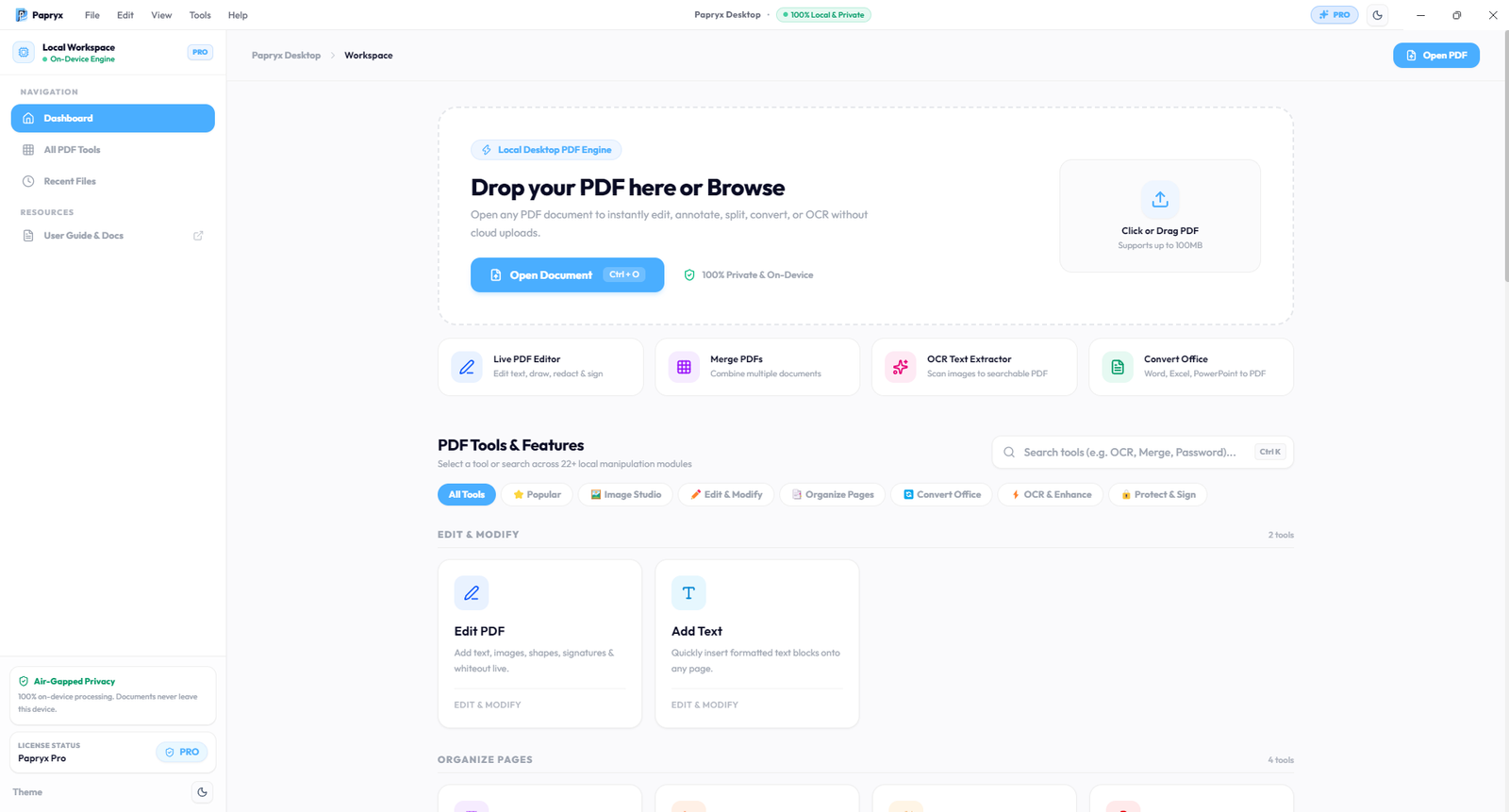
Papryx is a high-performance desktop workstation engineered for Windows (64-bit) and macOS (Apple Silicon & Intel). Unlike traditional SaaS web tools that require uploading documents to remote cloud queues, Papryx executes 100% on-device on your computer hardware.
Zero upload delay or bandwidth throttling. Files open and save at local NVMe SSD speeds.
Fully functional with Wi-Fi disabled or in high-security air-gapped enterprise environments.
Installation & Setup
Papryx is distributed as a standalone desktop installer for Windows (.exe) and macOS (.dmg), packaged with all necessary typographic fonts, OCR binary assets, and conversion engines bundled locally.
System Requirements
- Operating System: 64-bit Windows 10 or Windows 11 (x64), or macOS 13+ (Apple Silicon arm64 & Intel x64). (macOS builds currently available for direct beta evaluation; Developer ID notarization in progress)
- Memory: 4GB RAM minimum (8GB recommended for large batch conversions)
- Storage: ~850MB disk space (complete bundle including standalone OCR engine, local conversion binaries, and offline fonts)
- Privileges: Standard per-user installation (No administrator rights required)
Standard Setup Steps
- Download the
Papryx Setupinstaller received in your beta invitation email. - Run the setup executable or drag to Applications on macOS. The application launches instantly.
- Enter your 90-day Pro license key on first launch to unlock all 24+ tools.
License Activation & Offline Grace
Papryx uses cryptographic digital signature validation (Ed25519) to enforce single-seat licensing without tracking document usage.
- Cryptographic Local Vault: License entitlements are stored securely in OS-native encrypted storage (Windows DPAPI / macOS Keychain Services).
- 14-Day Offline Grace Period: Once activated, Papryx operates continuously offline for up to 14 days without requiring any internet connection.
- Machine Transfer: You can transfer your seat to a new computer by clicking Settings ➔ Deactivate License.
Seamless Auto-Updates & Continuous Delivery
Papryx Desktop features an enterprise-grade differential auto-update subsystem engineered to deliver silent updates without consuming massive network bandwidth or interrupting active workflows:
- Fastly CDN Differential Blockmaps: Instead of re-downloading the entire 300MB application, Papryx downloads only modified binary chunks (typically 5–20 MB), saving enterprise bandwidth.
- Zero-Latency Boot: Update checks are delayed 15 seconds after launch to ensure zero impact on instant cold-start application performance.
- Manual Menu Check: Users can manually check for the latest release at any time via Help ➔ Check for Updates... in the native menu bar.
- Data & License Preservation: All user preferences, recent files, and OS-native safeStorage license credentials (Windows DPAPI / macOS Keychain) persist automatically across updates.
Direct Text & Font Editor
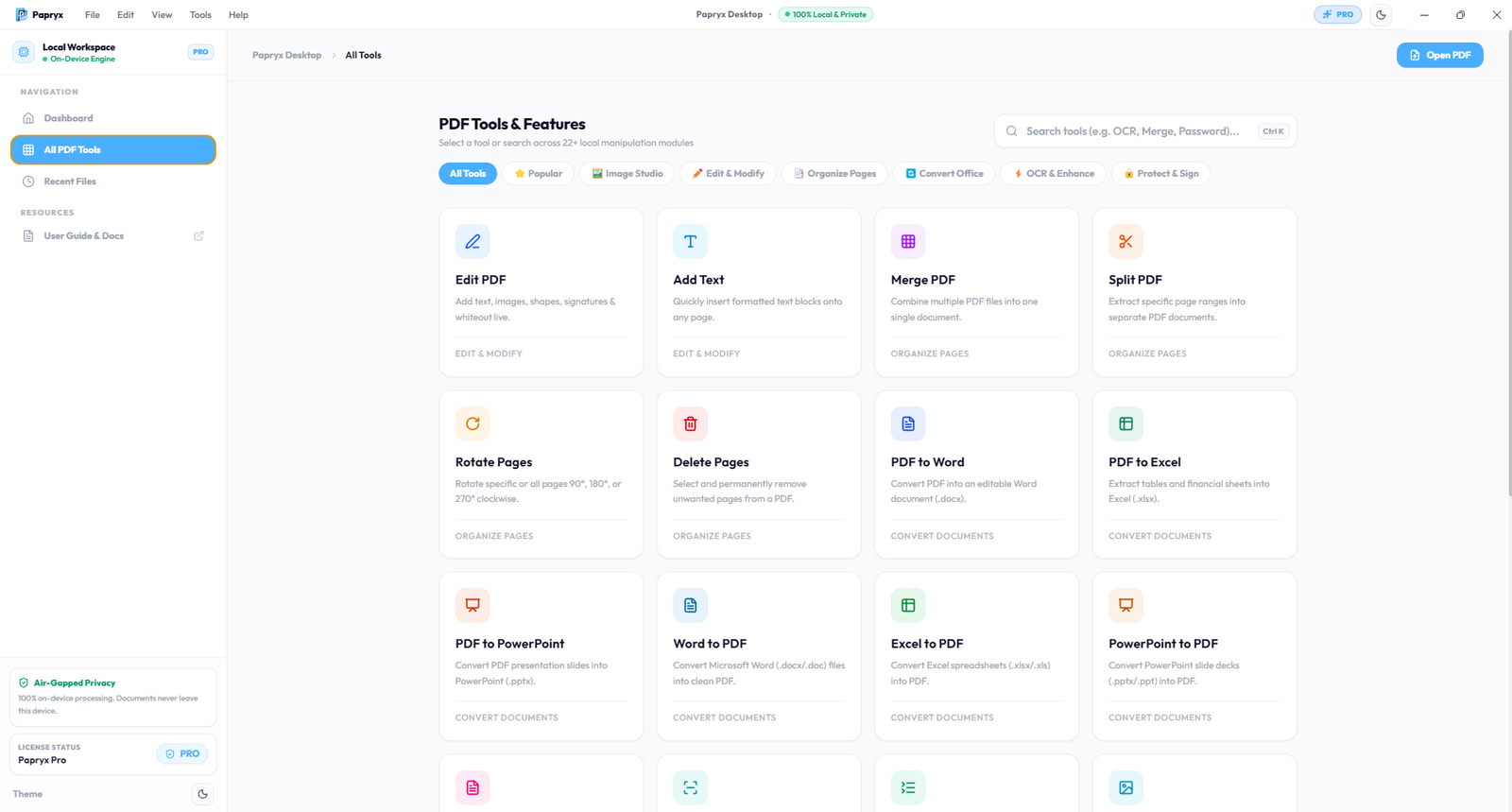
Click and edit text inline on PDF pages with coordinate-accurate typographic layout preservation. Papryx matches existing fonts dynamically or allows substituting from 22 bundled offline font families:
Two-Way Office Conversions
Convert documents locally with high visual fidelity and exact formatting preservation:
- PDF to Excel (.xlsx): High-precision table extraction with cell borders, number formatting, and Indian Rupee (₹) symbol preservation.
- PDF to Word (.docx): Converts complex multi-page contracts into formatted, editable Microsoft Word files.
- PDF to PowerPoint (.pptx): Extracts presentation decks and visual charts into native editable slide layouts.
- Office to PDF Batch: Batch converts Word, Excel, and PPT files into standard PDF binaries on-device.
On-Device OCR Scanner
Papryx bundles standalone Tesseract OCR binaries directly within the desktop installation. Extract text from mobile camera scans, invoices, and image-based PDFs without cloud APIs. Includes advanced on-device contrast normalization and deskew algorithms to clean up noisy paper backgrounds.
Organize & Compress Suite
A complete utility suite for daily PDF restructuring:
Reduce file sizes up to 80% dynamically with lossless stream optimization.
Combine hundreds of documents or extract custom page intervals in seconds.
Correct page orientations and remove blank/unwanted sheets visually.
Apply custom dynamic page numbering, headers, and confidential stamps.
Security & Redaction
Enterprise security controls to protect sensitive files before sharing:
- Permanent Vector Redaction: Completely scrubs underlying vector text, numbers, and metadata—not just black overlay rectangles.
- AES-256 Encryption: Apply military-grade User and Owner passwords to restrict document printing, modification, and copying.
- Electronic Signatures: Draw, type, or stamp verifiable digital seals onto contracts and client agreements.
- Metadata Scrubber: Strips author names, creation timestamps, and software history before distribution.
Universal Image Studio
A dedicated, high-performance image processing studio running completely on-device without cloud compression:
- Professional Image Resizer: Multi-mode resizing supporting exact pixel dimensions, percentage scaling, aspect ratio preservation, and standard document presets.
- Universal Format Converter: Instant batch conversion between HEIC/HEIF, PNG, JPG, WebP, AVIF, TIFF, BMP, and ICO formats.
- Bi-Directional Image-to-PDF: Compile multi-format photo sets into standard PDF documents or extract all pages of a PDF into high-DPI image assets.
Zero Document Egress Network Verification Guide
IT departments, CISOs, and security officers can independently audit Papryx’s zero document egress architecture on any Windows PC or Mac in under 60 seconds:
All document manipulation executes locally without opening outbound socket connections to external hosts.
Enterprise Compliance (GDPR / DPDPA)
By maintaining sovereign data custody on local hardware, Papryx is architected to support compliance with European GDPR Article 28 (processor exemptions), the Indian Digital Personal Data Protection Act (DPDPA 2023), and corporate non-disclosure agreements. Zero document bytes enter third-party cloud custody.