
How to Edit PDF Text on Windows Without Adobe Acrobat (The 100% Offline Guide)
The Problem with Cloud PDF Editors & Heavy Subscriptions
When users search for ways to edit a PDF without Adobe Acrobat, the internet overwhelmingly points them toward "free online PDF editors." While convenient for simple tasks, standard cloud editors introduce two major bottlenecks:
- Confidentiality Risks: Uploading proprietary balance sheets, medical records, or non-disclosure agreements to remote multi-tenant servers exposes your business to third-party data processing risks and potential compliance violations (GDPR, HIPAA, DPDPA).
- Text Alignment & Layout Mismatches: Many lightweight editors overlay crude text boxes that do not match the original embedded font metrics, resulting in awkward line wrapping, mismatched baseline heights, and visibly altered documents.
The Architecture of Local PDF Text Editing
Editing existing PDF text is notoriously complex because the PDF format was originally engineered as a fixed-layout digital printing specification rather than a word processor. Characters are placed at precise coordinate points (x, y) rather than in continuous text streams.
Papryx Desktop addresses this by bundling a standalone local PyMuPDF engine combined with a Single-Master Font Instantiation subsystem:
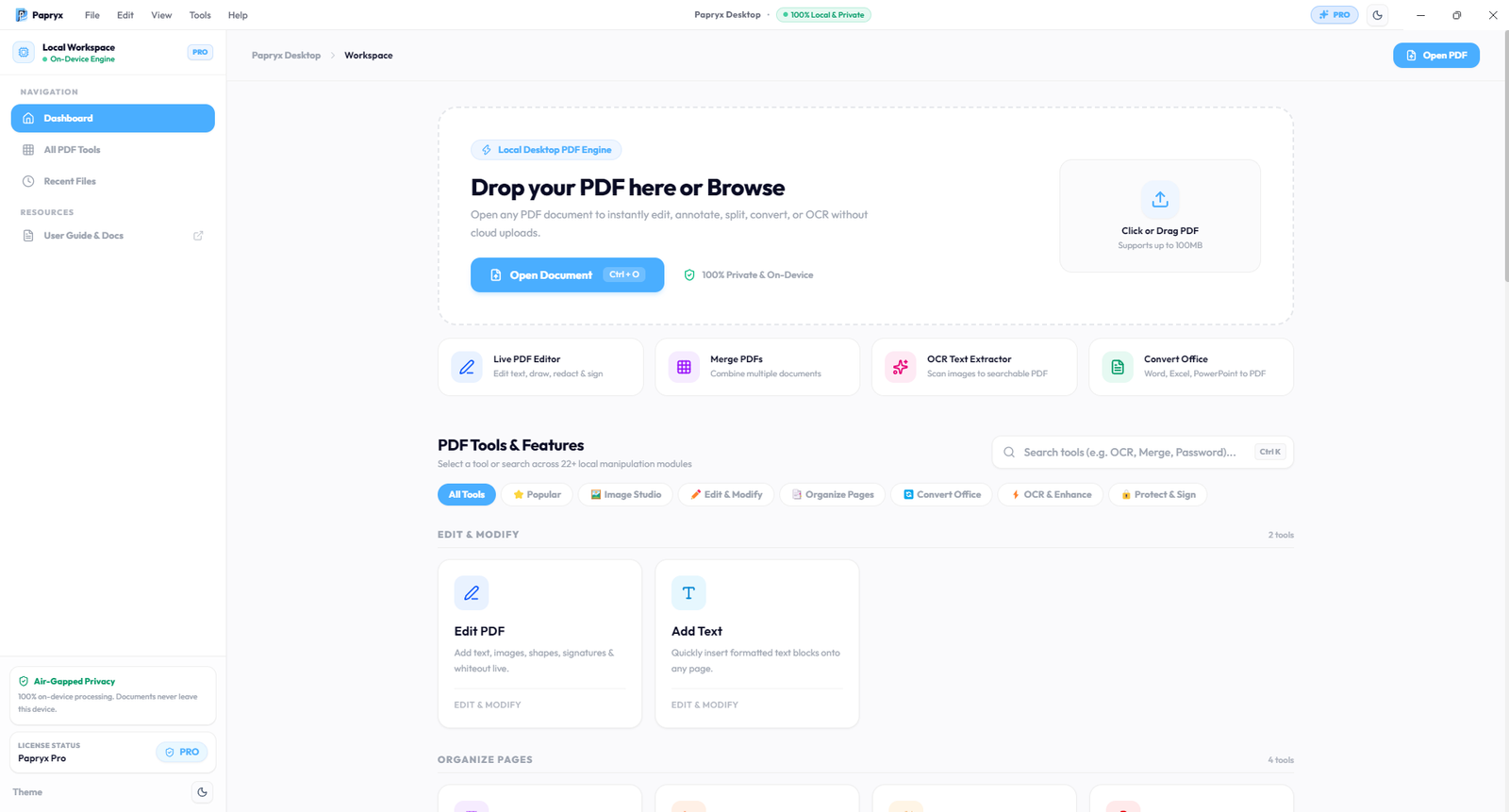
Papryx Desktop 1.0 — On-device workspace with instant local disk I/O and zero network requirements.
Step-by-Step: Editing PDF Text on Windows with Papryx
Step 1: Open Document via Local Disk
Launch Papryx Desktop on your 64-bit Windows PC. Drag and drop your target PDF into the workspace or click Open Document. Because processing occurs entirely in local RAM and NVMe SSD storage, even 500-page files load in under 300 milliseconds.
Step 2: Select Text and Adjust Baseline Metrics
Click directly on any text line. Papryx identifies the underlying font family, glyph bounding boxes, point size, and letter-spacing metrics. If the document uses a proprietary font not installed on your system, Papryx automatically activates one of its 22 bundled offline TrueType fallback fonts (Liberation Sans, Carlito, Roboto) to preserve 0px baseline alignment.
Step 3: Modify Content and Vector Elements
Type your revisions directly into the inline editor. You can also insert digital signatures, highlight key clauses, or apply permanent vector redaction to mask sensitive financial figures before distribution.
Step 4: Export Clean ISO-32000 PDF
Click Save or Export to write the revised document directly to your local folder. The original document tree is updated cleanly without watermarks, page limits, or server round-trips.
Comparison: Adobe Acrobat vs. Cloud Editors vs. Papryx Desktop
| Feature | Adobe Acrobat Pro | Cloud Web SaaS | Papryx Desktop |
|---|---|---|---|
| Privacy Model | Cloud Sync Prompts | Uploaded to S3/Cloud | 100% Air-Gapped Local |
| Pricing | $239.88 / year recurring | $72–$144 / year | Free Beta / One-time |
| Offline Operation | Partial (Needs Cloud Auth) | Impossible (Requires Net) | Complete (0 Internet) |
| Font Baseline Drift | Low | High (Crude Overlays) | 0px Displacement |
Conclusion
Editing PDF text on Windows does not require handing over monthly subscription fees or sacrificing document confidentiality. By leveraging native on-device desktop software, professionals gain total document privacy, instant performance, and precise typographic fidelity.
Frequently Asked Questions
Can I edit PDF text without Adobe Acrobat for free?
Yes, Papryx Desktop provides complete on-device PDF text editing, allowing you to edit text, insert images, and add signatures on Windows without Adobe subscriptions.
Why does edited PDF text sometimes look displaced or distorted?
Most online editors lack font substitution matrices. Papryx Desktop resolves this with 22 bundled offline TrueType fallback fonts and single-master metric matching to guarantee 0px text drift.
Try Papryx Desktop on Windows
Experience precision PDF text editing with original layout preservation, offline Tesseract OCR, and zero cloud uploads. Request early evaluation access today.